You are comparing two CTR tools and need to know which one fits your search campaigns. Both promise automated visits, but they differ in proof, channel coverage, and how much control you get over each click. That gap matters when your budget is tied to daily search counts.
This article breaks down CTRTool and CTR Booster feature by feature, including screenshot evidence, Google, Bing, Maps and AI Overviews coverage, desktop versus mobile campaigns, and pricing. By the end, you will have a clear verdict on which tool matches your campaign needs.
Quick Verdict: CTR Booster vs CTRTool
If you want documented proof for every CTR visit and coverage across Google, Bing, Maps and AI Overviews, CTRTool is the stronger choice; if you need a long-established generalist, CTR Booster may suit you. The two tools sit in the same corner of the market, but they answer different questions about a search campaign.
CTRTool's standout is screenshot proof for every visit, delivered as separate search and landing proof images. It also covers more surfaces than a typical CTR tool, including Google Search, Bing Search, Maps and AI Overviews.
CTR Booster is a well-known name in the CTR space, and that familiarity is its main draw. Its exact feature set and pricing should be confirmed on its own site, since details in this category change and are not restated here.
The trade-off comes down to proof and transparency versus generalist familiarity. CTRTool is built around verifiable visits and tracked keyword positions, while CTR Booster leans on its reputation as an established option.
CTRTool also runs on a pay-for-results credit model. No credits are charged for technical failures before landing, and visits that cannot verify the requested location use none either. One credit balance covers every campaign type, website and keyword, unused credits roll over while you are subscribed, and a single account supports up to 100 campaigns with 100 keywords each.
- Choose CTRTool if you want screenshot proof, multi-channel coverage and tracked keyword positions including Maps listing order and AI citation order.
- Consider CTR Booster if a long-established generalist name is your priority and you are comfortable verifying its current specs directly.
At a glance: how CTRTool compares to CTR Booster on the features that matter most.
| Feature | CTRTool | CTR Booster |
|---|---|---|
| Pricing | $59/mo Starter | — |
| Free plan / trial | ✗ | — |
| Positioning | CTR tool w/ proof | CTR traffic bot |
| Primary use case | CTR campaigns | CTR manipulation |
| Geo/GPS targeting | Country/state/city | GPS coordinates |
| Proxy support | — | Recommends 4G proxy |
| Supported platforms | Google/Bing/Maps/AI | — |
| Screenshot proof per visit | ✓ | — |
What Is CTRTool?
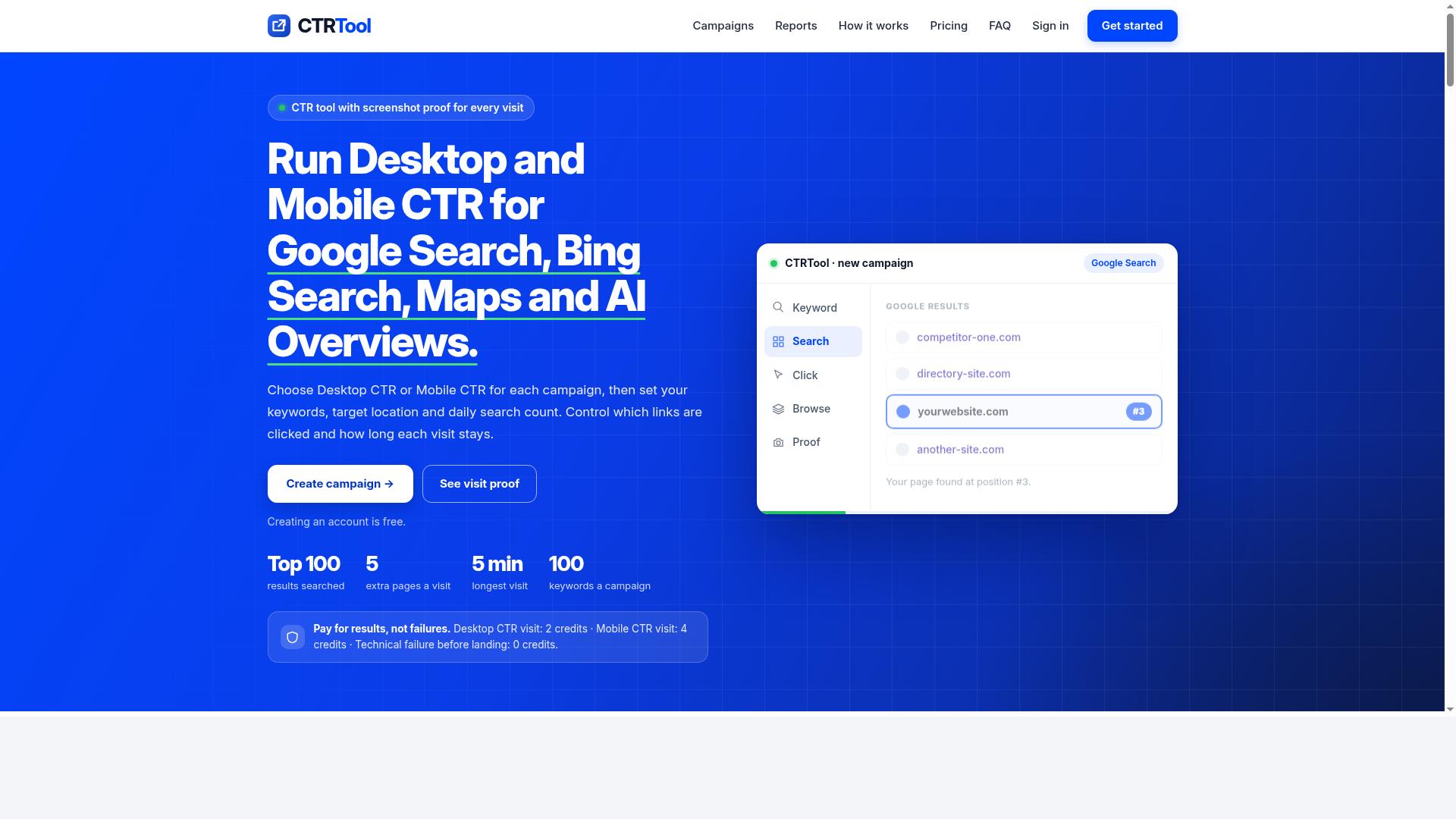
CTRTool is a CTR campaign tool that runs Desktop and Mobile CTR campaigns for Google Search, Bing Search, Maps and AI Overviews, with screenshot proof for every visit. It is built for SEO practitioners and agencies running campaigns for their own sites or for client properties.
Each campaign is configured around the details that matter for keyword targeting and location relevance. Users choose Desktop CTR or Mobile CTR per campaign, then set the keywords, the target location and the daily search count. They also control which links are clicked and how long each visit stays.
The proof model separates evidence into two distinct images. Every visit produces a search screenshot and a landing screenshot, so practitioners can review what was searched and what was actually loaded.
CTRTool is upfront about limits. The site states: 'Automated visits do not guarantee rankings.' That framing keeps expectations grounded, which matters when comparing it against tools such as CTR Booster that may present themselves differently.
What Is CTR Booster?
CTR Booster is another tool in the CTR campaign space, often referenced by SEOs looking to influence click-through rates on search results. It is generally understood to support click-through rate campaigns aimed at search results, and it appears in discussions among practitioners who want to shape how often their listings earn clicks.
Descriptions of the tool tend to stay at a high level. Public commentary treats it as one option in a crowded field, and specifics such as features, pricing, or technical details are best confirmed directly with the vendor rather than assumed from secondhand summaries.
For readers weighing options, the practical takeaway is simple. CTR Booster belongs on a shortlist of tools associated with CTR work, but any evaluation of its fit for your search campaigns should rest on current, verifiable information and a clear view of your own goals. The comparison sections that follow focus on how to judge tools in this category rather than on unconfirmed claims about any single product.
Features Compared
This section breaks down the practical differences between CTRTool and CTR Booster across proof, channel coverage and campaign controls. These three areas matter most when choosing a CTR tool for search campaigns, because they determine what you can show a client, where you can run campaigns and how precisely you can steer them.
The first area is proof and transparency: whether each visit leaves a documented trail you can hand to a client. The second is channel coverage, meaning which surfaces the tool supports beyond classic organic results. The third is campaign control, covering device targeting, keyword targeting, location settings and daily visit pacing.
Facts about CTRTool in this comparison are drawn from its own site and documentation. CTR Booster is described in general terms and hedged where verified specifications are not available, so check its current details directly before relying on any single feature.
Proof and Transparency: Screenshot Evidence per Visit
CTRTool provides screenshot proof for every visit, with search and landing screenshots as separate proof images, plus full visit paths and keyword position tracking over time. This gives agencies a documented record of activity rather than a bare visit count.
The reporting layer goes further than simple screenshots. Keyword positions are tracked over time across Search positions, Maps listing order and AI citation order, so you can show a client how visibility on each surface moves across a reporting period.
For agencies managing multiple clients, this matters for accountability. When a client asks what was done and when, you can point to specific visits with their search and landing evidence, the path taken through the site and the keyword context behind each one.
The credit model reinforces the transparency angle. CTRTool uses a pay-for-results credit model, with no credits charged for technical failures before landing, and visits that cannot verify the requested location also use no credits. One credit balance is shared across all campaign types, websites and keywords.
For CTR Booster, proof and transparency features are not verifiable from public information. If documented evidence per visit is a priority for your reporting, confirm the specifics directly with the vendor before committing.
Channel Coverage: Google, Bing, Maps and AI Overviews
CTRTool covers Google Search, Bing Search, Google Maps and AI Overviews, letting you run CTR campaigns across all four channels from one tool. Each campaign type follows the same core pattern: find the target in the results, then click through to the site.
- Google Search CTR: search the keyword and click the organic result, on Desktop or Mobile, within the Top 100 results, with optional internal pages.
- Bing Search CTR: the same search-and-click flow applied to Bing results.
- Google Maps CTR: find the business listing and click its website link, checking up to 50 listings, with city targeting.
- AI Overview CTR: find the website in the AI Overview and click its source link, which requires a matching citation.
Campaigns can target a chosen country with an optional state or city, or use Any country when location is not a constraint. Delivery runs through Desktop Chrome windows and real Android phone sessions matched to the target location through managed proxy routes.
Coverage across Maps and AI Overviews is increasingly relevant for local businesses and for sites competing in AI-generated answer surfaces. A single tool handling all four channels keeps campaign management in one place instead of splitting budgets and reporting across separate systems.
CTR Booster's channel coverage is not confirmed here. Its supported surfaces and any limitations should be verified on its own site before you map campaigns to channels.
Campaign Control: Desktop vs Mobile, Keywords, Location and Daily Counts
CTRTool lets you choose Desktop CTR or Mobile CTR per campaign, set keywords, target a country (and optionally state/city), and control daily visit counts. These levers map directly to how a real audience reaches a site, which is useful for device targeting and for keeping activity paced rather than bursty.
Keyword selection has a clear rule: the page must appear within the top 100 organic results for the chosen keyword and location. Search depth reaches up to 100, so campaigns stay grounded in results the page can actually be found in.
Daily search counts can be set with now, spread out or gap timing, along with days, hours and time zone. Daily goals reset at 00:00 UTC, which keeps scheduling predictable across regions.
Campaign setup also covers target URL, internal page URLs and link text, click order and scrolling time. Visits can run up to five minutes total with up to five additional internal pages, and each account supports up to 100 campaigns with 100 keywords each.
Channel-specific rules apply on top of these controls. Maps campaigns check up to 50 listings (about five pages), and AI Overview campaigns need a matching source link before a visit can proceed. Custom form filling or other custom actions are available through support with a separate agreed one-time fee.
CTRTool explicitly does not guarantee higher rankings, leads or sales, so treat these controls as a way to shape and document traffic, not as a ranking promise. CTR Booster's control options are not detailed here and should be checked directly against your requirements.
Pricing Compared
CTRTool publishes monthly USD plans: Starter at $59/month for 2,000 credits (up to 1,000 Desktop CTR visits or 500 Mobile CTR visits) and Growth at $125/month for 5,000 credits. That clarity makes it easy to map spend to expected visits before you commit to a CTR tool for search campaigns.
The two larger tiers scale the same way. Scale runs $399/month for 20,000 credits (up to 10,000 Desktop or 5,000 Mobile visits), and Agency runs $699/month for 40,000 credits (up to 20,000 Desktop or 10,000 Mobile visits). Growth is marked Recommended on the site.
| Plan | Monthly Price | Credits | Desktop Visits | Mobile Visits |
|---|---|---|---|---|
| Starter | $59 | 2,000 | Up to 1,000 | Up to 500 |
| Growth | $125 | 5,000 | Up to 2,500 | Up to 1,250 |
| Scale | $399 | 20,000 | Up to 10,000 | Up to 5,000 |
| Agency | $699 | 40,000 | Up to 20,000 | Up to 10,000 |
The credit-to-visit conversion is the key to estimating cost per visit. A Desktop CTR visit costs 2 credits and a Mobile CTR visit costs 4 credits, so mobile traffic effectively costs twice as much credit per visit. A verified search without a match costs 1 credit, and a technical failure before landing costs 0 credits.
Run the math against your own mix before choosing a tier. If most of your device targeting leans desktop, the Starter allowance stretches further than it would on a mobile-heavy campaign. For paid search teams balancing ad spend and CPC, that predictability helps keep cost per visit inside budget.
Two billing details matter for planning. Unused credits roll over while your subscription is active and expire when cancellation takes effect, so credits are not lost month to month. Creating an account is free, and custom development carries a separate, agreed one-time fee.
CTRTool also notes a limited launch pricing window, with prices rising 30% on November 15 (the page shows November 15, 2026). Readers comparing tiers today may want to weigh that against waiting.
CTR Booster's pricing is not listed here, so confirm current rates and what each plan includes directly on its site before comparing totals. Plan structures and credit definitions vary between CTR tools, and a headline monthly figure says little until you know how many visits it actually buys.
The practical takeaway: CTRTool publishes clear per-visit credit costs across four tiers, which makes budgeting for click-through rate campaigns straightforward. Check CTR Booster's published terms alongside these figures to see which tool fits your search campaign volume and device mix.
Who Should Choose CTRTool
CTRTool fits SEO practitioners and agencies who need documented proof for every visit and want to run campaigns across Google, Bing, Maps and AI Overviews. The tool is built around proof-based reporting, so each visit can be tied to a screenshot and a full visit path rather than a bare counter.
Agencies running CTR campaigns for clients benefit most from that paper trail. When a client asks what happened to their ad spend or which searches were touched, the visit path and screenshot evidence give you something concrete to show in a report. That matters for campaign management across multiple client accounts.
SEOs working several channels at once also fit well here. CTRTool covers Google Search, Bing Search, Google Maps and AI Overviews, so one workflow can serve organic ranking work and local visibility together. Per-campaign Desktop and Mobile control plus location targeting let you shape device targeting and audience targeting to match each client's market.
Teams using tier links, PBNs or test properties for keyword targeting should also consider it. The site's own guidance points to those setups, and the proof-based positioning suits practitioners who need to defend results rather than just observe them.
Who Should Choose CTR Booster
CTR Booster may suit users who prefer a long-established generalist tool and do not require per-visit screenshot proof. That kind of buyer values familiarity over granular verification, and is comfortable trusting aggregate reporting when judging whether a click-through rate campaign is working.
It may also appeal to teams that already have a workflow built around a different feature set and would rather not rebuild it. Neither preference is wrong. They simply point to a different set of priorities than a specialist CTR tool built around proof of delivery.
Because publicly available information about CTR Booster can change, treat any feature or pricing detail you see in older reviews as a starting point only. Verify current capabilities and pricing directly on CTR Booster's own site before you commit budget or set up campaigns.
As a general guide, CTR Booster is worth a closer look if most of the following sound like you:
- You want one tool that covers many marketing tasks rather than a narrow CTR focus.
- You are comfortable with summary-level reporting and do not need a record for each individual visit.
- Your team already knows the interface and switching costs feel higher than the benefit.
- You plan to run small, low-risk tests before scaling any spend.
If any of those points feel like a compromise rather than a convenience, that is a signal to weigh the alternatives carefully. Buyers who care about accountability for every click, or who run paid search and organic campaigns side by side, often find that a purpose-built CTR tool answers their questions more directly.
The practical next step is a short trial on a low-stakes campaign. Compare what each tool actually shows you about delivered clicks against what you expected, then decide which report you would trust when ad spend and quality score are on the line.
Final Verdict
For teams that need proof and multi-channel coverage, CTRTool is the clearer choice; CTR Booster remains an option for those who prefer a generalist tool and will verify its current specs themselves.
The reasoning comes down to three practical points: documented evidence for each visit, coverage across the channels that matter in modern search campaigns, and pricing you can read without a sales call.
| Decision Factor | CTRTool | CTR Booster |
|---|---|---|
| Visit proof | Screenshot proof for every visit, with search and landing screenshots as separate proof images | General descriptions of tracking; confirm current reporting detail directly |
| Channel coverage | Google, Bing, Maps, and AI Overviews | Generalist positioning; check current supported surfaces |
| Pricing model | Pay-for-results credits, with no credits charged for technical failures before landing | Verify current plans and terms directly |
| Position tracking | Keyword positions over time, including Maps listing order and AI citation order | Confirm available reporting |
The key differentiator is the screenshot proof attached to every visit. Full visit paths and separate search and landing proof images mean campaign management decisions rest on evidence rather than on a dashboard number alone.
CTRTool also tracks keyword positions over time, including Maps listing order and AI citation order, which matters as more search activity moves beyond the classic ten blue links.
The credit model keeps risk low. Visits that cannot verify the requested location use no credits, and unused credits roll over while subscribed. One credit balance is shared across all campaign types, websites, and keywords, with up to 100 campaigns holding 100 keywords each.
Visits can run up to 5 minutes and include up to 5 additional internal pages, which gives engagement metrics room to register naturally. That depth supports headline testing, meta description refinement, and title tag decisions with better data behind them.
- Agencies: choose CTRTool when clients expect proof, since per-visit screenshots and channel coverage across Google, Bing, Maps, and AI Overviews simplify reporting and campaign management across accounts.
- Individual SEOs: CTRTool fits when you want transparent, pay-for-results pricing and a single credit balance covering every keyword and site you run.
- Generalist preference: CTR Booster stays a reasonable alternative for those who value a broader toolset, provided you confirm its current features and pricing yourself.
To review the full feature set and pricing, visit ctrtool.com. For questions before you decide, contact support at vaibhav@autoblogging.ai.
Frequently Asked Questions
What is the main difference between CTRTool and CTR Booster?
CTRTool is a CTR campaign tool built around proof: every visit comes with search and landing screenshots, plus full visit paths and keyword position tracking over time. CTR Booster is described in sources only as a "traffic bot" or CTR manipulation tool, with details like GPS coordinate setting mentioned in forum threads. If verifiable proof of each visit matters to your workflow, that is where CTRTool stands apart.
Which platforms can I run campaigns on with CTRTool?
CTRTool supports Google Search, Bing Search, Google Maps and AI Overviews, with Desktop or Mobile CTR chosen per campaign. You set keywords, target a country (optionally a state and city), and the tool works through the top 100 organic results - Maps campaigns check up to 50 listings, and AI Overview campaigns require a matching source link. Competitor sources don't detail comparable platform coverage, so check directly with CTR Booster for its scope.
How does CTRTool's pricing work compared to CTR Booster?
CTRTool publishes clear monthly plans in USD: Starter at $59/month for 2,000 credits (up to 1,000 Desktop or 500 Mobile CTR visits) and Growth at $125/month for 5,000 credits (up to 2,500 Desktop or 1,250 Mobile visits), with a pay-for-results credit model. CTR Booster's pricing is not stated in the sources we reviewed, so we can't compare costs directly - you'd need to confirm its plans with the vendor.
Can I see proof that my CTR campaigns actually ran?
Yes - screenshot proof for every visit is CTRTool's core feature, with search and landing screenshots provided as separate proof images, along with full visit paths. Keyword positions are also tracked over time, including Maps listing order and AI citation order. The researched sources on CTR Booster don't describe a screenshot-proof mechanism, so this is a point to verify with them if proof is essential.
Who is each tool best suited for?
CTRTool is aimed at SEO practitioners and agencies running CTR campaigns for their own or client websites across Google Search, Bing, Maps and AI Overviews, and its guidance covers tier links, PBNs and test properties. CTR Booster appears in sources as a general traffic bot, which may suit users exploring basic CTR manipulation. Agencies needing documented, per-visit evidence for clients will likely find CTRTool the more practical fit.
Do I need to install software to use CTRTool?
No - CTRTool is an online SaaS tool, so you sign in through the website and manage campaigns from there, targeting any supported country globally with no stated country restrictions. CTR Booster's delivery model isn't specified in the sources we reviewed, so confirm its setup requirements directly. For support, CTRTool lists vaibhav@autoblogging.ai as its contact email.